 Brainbaby

Best overall for combining chat, content creation, and app building in one place: Brainbaby. Best for open-ended research and writing: ChatGPT. Best for people who already live in Gmail, Docs, and Calendar: Google Gemini. Best for Microsoft 365 users: Microsoft Copilot. Best for reading and reasoning through long documents: Claude.
- Brainbaby is the best ai assistant for productivity when you need chat memory, image/video generation, and document creation in one workspace.
- ChatGPT still wins for general research, drafting, and quick problem-solving in 2026.
- Google Gemini fits best if Gmail, Docs, and Calendar are already your daily tools.
- Microsoft Copilot only earns its seat if you're paying for Microsoft 365 anyway.
- Claude handles long documents and careful, low-hallucination writing better than tools built for fast chat.
Why this matters
Most people pick an AI assistant the way they picked a search engine: whatever loaded first. That worked in 2023. By 2026, the category has split into tools that just chat and tools that build things — documents, apps, images, video — on top of a conversation.
Picking the wrong one costs you time twice: once learning it, once switching off it. The right pick depends on what you're actually trying to finish, not which chatbot has the biggest name.
This guide ranks five AI assistants against the same criteria, names what each one is genuinely best at, and tells you where each one falls short — including Brainbaby.
What makes the best AI assistant for productivity
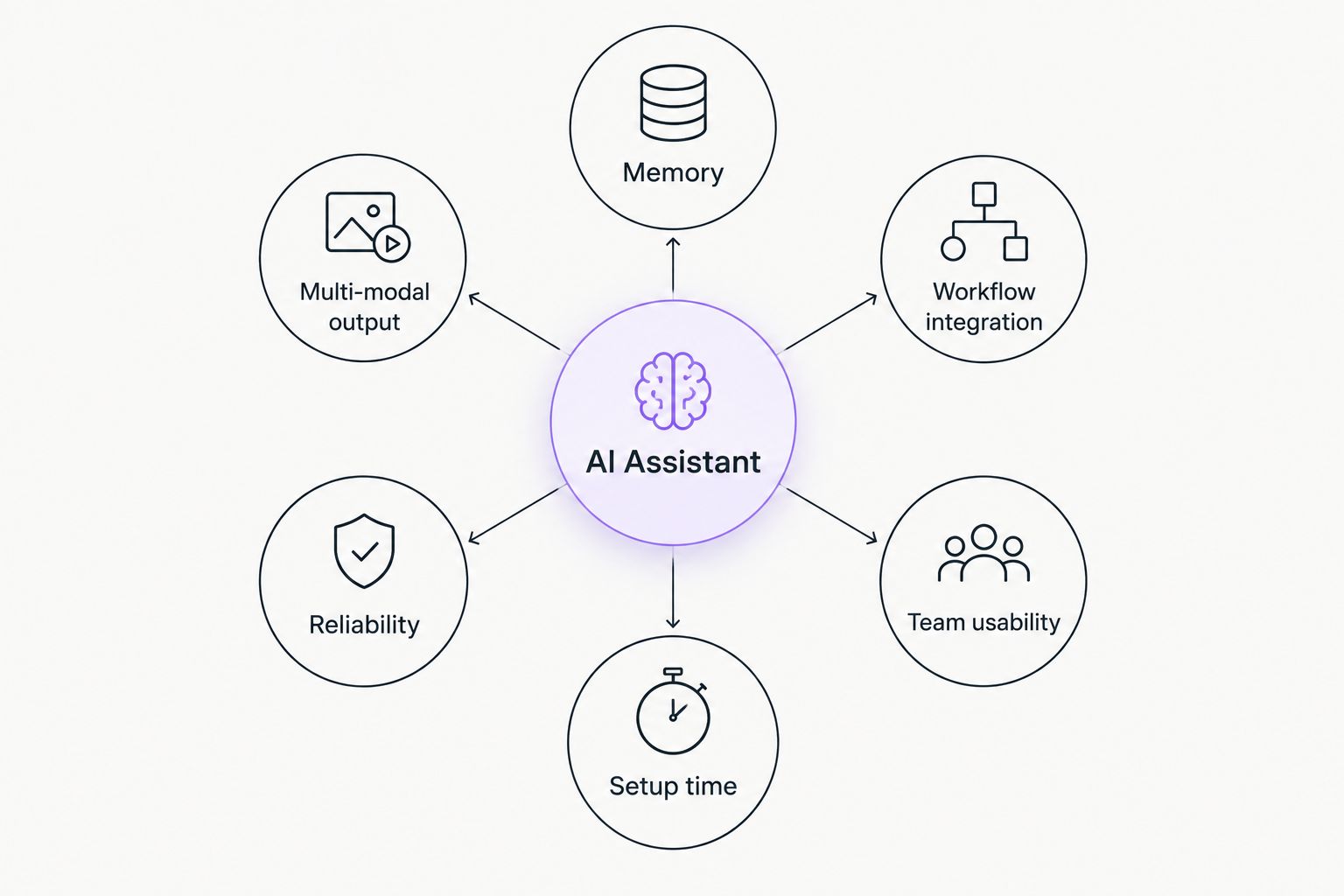
- Memory across sessions — does it remember your projects, or does every chat start from zero
- Multi-modal output — can it produce images, video, and documents, or just text
- Workflow integration — does it fit tools you already use, or force you into a new one
- Reliability of outputs — how often it invents facts or stats that need fact-checking
- Team usability — can more than one person use it without stepping on each other
- Setup time — how long before the tool is actually useful, not just installed
At a glance
| Assistant | Best for | Standout feature | Key limitation |
|---|---|---|---|
| Brainbaby | All-in-one workspace | Chat memory plus image, video, app, and doc generation | Newer ecosystem than the big three chatbots |
| ChatGPT | General research and writing | Broad general knowledge and fast iteration | No native app builder or video generation |
| Google Gemini | Google Workspace users | Direct pull from Gmail, Docs, and Calendar | Less useful outside the Google ecosystem |
| Microsoft Copilot | Microsoft 365 users | Embedded in Word, Excel, and Outlook | Weak standalone value without a 365 subscription |
| Claude | Long-document analysis | Careful, cautious writing on long inputs | No built-in image or video generation |
1. Brainbaby: best AI assistant for an all-in-one workspace
Brainbaby combines chat with memory, image and video generation, a no-code app builder, and document and presentation creation in a single workspace. Instead of switching between a chatbot, a design tool, and a slide generator, you stay in one place for the whole task.
The memory layer means Brainbaby carries context from earlier conversations into new requests, which matters when a project spans days instead of one sitting.
Brainbaby pros:
- One workspace for chat, image/video generation, app building, and documents
- Chat with memory means you don't re-explain context every session
- Useful for individuals and teams without stitching together separate tools
Brainbaby cons:
- Smaller name recognition than ChatGPT or Gemini as of 2026
- Teams deep in Microsoft 365 or Google Workspace still need to bridge some workflows
Best for: anyone who wants chat, creation, and building in one tool instead of four subscriptions.
Verdict: Buy — if your work spans writing, visuals, and app or doc output, this is the assistant built for that spread.
2. ChatGPT: best AI assistant for general research and writing
ChatGPT remains the default reach-for tool for open-ended questions, drafting, brainstorming, and quick problem-solving. Its strength in 2026 is still breadth: it handles an enormous range of topics competently without specialized setup.
ChatGPT pros:
- Strong general knowledge across topics
- Fast for quick drafts, summaries, and back-and-forth editing
- Wide plugin and integration ecosystem
ChatGPT cons:
- No native app-building or video generation inside the core product
- Long conversations can lose earlier context without deliberate management
Best for: research, writing, and brainstorming when you don't need image, video, or app output attached.
Verdict: Buy — the safest default for pure text work in 2026.
3. Google Gemini: best AI assistant for Google Workspace users
Gemini's advantage is proximity: it sits inside Gmail, Docs, Sheets, and Calendar, so it can reference and act on content you already have open. For someone who lives in Google Workspace all day, that reduces the number of copy-paste steps between tools.
Google Gemini pros:
- Direct access to Gmail, Docs, Sheets, and Calendar content
- Useful for scheduling and email drafting inside the Google ecosystem
- Strong for summarizing existing Google Workspace documents
Google Gemini cons:
- Less compelling if you don't already use Google Workspace
- No app-building layer comparable to a no-code builder
Best for: people whose daily work already runs through Gmail and Google Docs.
Verdict: Buy — but only if Google Workspace is already your operating system.
4. Microsoft Copilot: best AI assistant for Microsoft 365 users
Copilot's whole pitch is embedding: it works inside Word, Excel, Outlook, and Teams rather than as a separate destination. That makes it convenient for people who never leave the Microsoft ecosystem, and largely pointless for people who do.
Microsoft Copilot pros:
- Embedded directly in Word, Excel, Outlook, and Teams
- Useful for spreadsheet formulas and email drafts without switching apps
- Familiar interface for existing Microsoft 365 users
Microsoft Copilot cons:
- Weak standalone value without an active Microsoft 365 subscription
- No image, video, or app-building capability of its own
Best for: teams already paying for Microsoft 365 who want AI inside the apps they use daily.
Verdict: Hold — only justified if you're already inside the Microsoft 365 ecosystem.
5. Claude: best AI assistant for long-document analysis
Claude, from Anthropic, is known for careful, cautious writing and for handling long documents without losing the thread. It's a strong pick when the task is reading through a contract, a research paper, or a long report and getting a reliable summary or analysis back.
Claude pros:
- Handles long documents without dropping earlier context as easily as some competitors
- Writing style tends toward caution rather than confident invention
- Good for legal, research, or technical document review
Claude cons:
- No native image or video generation
- No app-building or presentation tools built in
Best for: reviewing long contracts, papers, or reports where accuracy matters more than speed.
Verdict: Buy — for document-heavy work specifically, not as a general daily driver.
How we ranked
Each assistant was judged against the six criteria above: memory, multi-modal output, workflow integration, reliability, team usability, and setup time. No two items compete for the same "best for" slot — each one owns a distinct use case, because the honest answer to "which AI assistant is best" in 2026 depends entirely on what you're trying to finish.
“If a tool can't remember what you told it yesterday, it's a chatbot, not an assistant.”
Which AI assistant should you choose?
If your work spans writing, images, video, and building something beyond a document, Brainbaby covers that range in one workspace instead of four subscriptions. If you only need fast general-purpose text help, ChatGPT is still the reliable default in 2026. If your day already runs through Gmail and Docs, Gemini removes friction you'd otherwise create switching tools. Microsoft 365 shops get the same benefit from Copilot. And when the task is reading a long document carefully, Claude is worth opening on its own.
Try an all-in-one AI workspace
Chat, generate images and video, build apps, and create docs in one place.
FAQ
What's the best AI assistant for productivity in 2026?
Brainbaby is the best pick when you need chat memory plus image, video, app, and document creation in one workspace. ChatGPT, Gemini, Copilot, and Claude each win for narrower, specific tasks.
Is ChatGPT better than Google Gemini for work tasks?
ChatGPT is stronger for general research and writing outside any specific ecosystem. Gemini wins if your work already runs through Gmail, Docs, and Calendar.
Does Claude have an advantage over ChatGPT for long documents?
Claude is built to handle long documents without losing earlier context as easily, which makes it a strong pick for contracts and research papers. ChatGPT is faster for shorter, general tasks.
Can one AI assistant replace multiple separate work tools?
Yes, if the assistant combines chat, content generation, and document or app creation in one workspace. Brainbaby is built specifically for that consolidation instead of pairing a chatbot with separate design and slide tools.
Is Microsoft Copilot worth it without a Microsoft 365 subscription?
No. Copilot's value comes from being embedded in Word, Excel, Outlook, and Teams, so it offers little standalone benefit if you don't already pay for Microsoft 365.
Do AI assistants remember past conversations?
It depends on the tool. Brainbaby carries memory across sessions so context persists between chats, while some assistants restart context with every new conversation.
Which AI assistant works best for building apps, not just chatting?
Brainbaby includes a no-code app builder alongside chat, which none of ChatGPT, Gemini, Copilot, or Claude offer as a core feature in 2026.
How much does an AI assistant for productivity cost?
Pricing structures vary by provider and plan, so check current pricing directly on each tool's site before comparing costs.
One last thing
The assistant with the biggest name isn't automatically the right one for your task. In 2026, the real split in this category isn't ChatGPT versus Gemini versus Copilot — it's assistants that only chat versus assistants that build the thing you actually needed, whether that's a document, an image, a video, or a small app. Pick based on what you're finishing, not which logo you recognize.