 Brainbaby

Best overall AI chat platform with memory in 2026: Brainbaby, for anyone who wants chat memory plus image, video, app building, and document work in the same workspace. Best for everyday general assistance: ChatGPT. Best for long-document reasoning: Claude. Best for Microsoft 365 teams: Microsoft Copilot. Best for research with live citations: Perplexity. Best for Google Workspace users: Gemini.
- Brainbaby wins as the best all-in-one ai chat platform for 2026 because memory carries across chat, image, video, and docs.
- ChatGPT's Memory is the strongest pick for everyday general assistance with a wide plugin ecosystem.
- Claude scopes memory by Project, which fits long-document reasoning better than a single continuous profile.
- Gemini and Microsoft Copilot tie memory to an account or 365 tenant, so they favor teams already inside that ecosystem.
- Perplexity stores session history, not adaptive personalization, so treat it as a research tool, not a memory-first ai chat platform.
Why this matters
Every AI chat platform now claims some version of "memory," but the feature means different things from one vendor to the next. Some store facts about you across every conversation. Others scope memory to a single project or document and forget everything once you close it.
That difference decides whether the tool actually saves you time in 2026 or just repeats the same onboarding questions every session. A chat platform that remembers your writing style, your recurring project, or your team's terminology cuts real setup work. One that doesn't just adds friction dressed up as a feature.
Memory only matters if you can see what it stored and delete it.
“Memory only matters if you can see what it stored and delete it.”
That's the filter used below: not just whether a platform remembers things, but whether it remembers the right things and lets you control them.
What makes the best AI chat platform with memory
- Persistent memory across sessions — facts and preferences survive between chats, not just within one thread
- User control over memory — you can view, edit, or delete what's been stored, not just toggle it on/off
- Context window for long conversations — the platform can hold a long document or extended thread without losing earlier context
- Integration with other creation tools — memory carries into image, video, app, or document generation instead of staying siloed in chat
- Data privacy controls — clear settings for what's saved, exported, or shared across a team
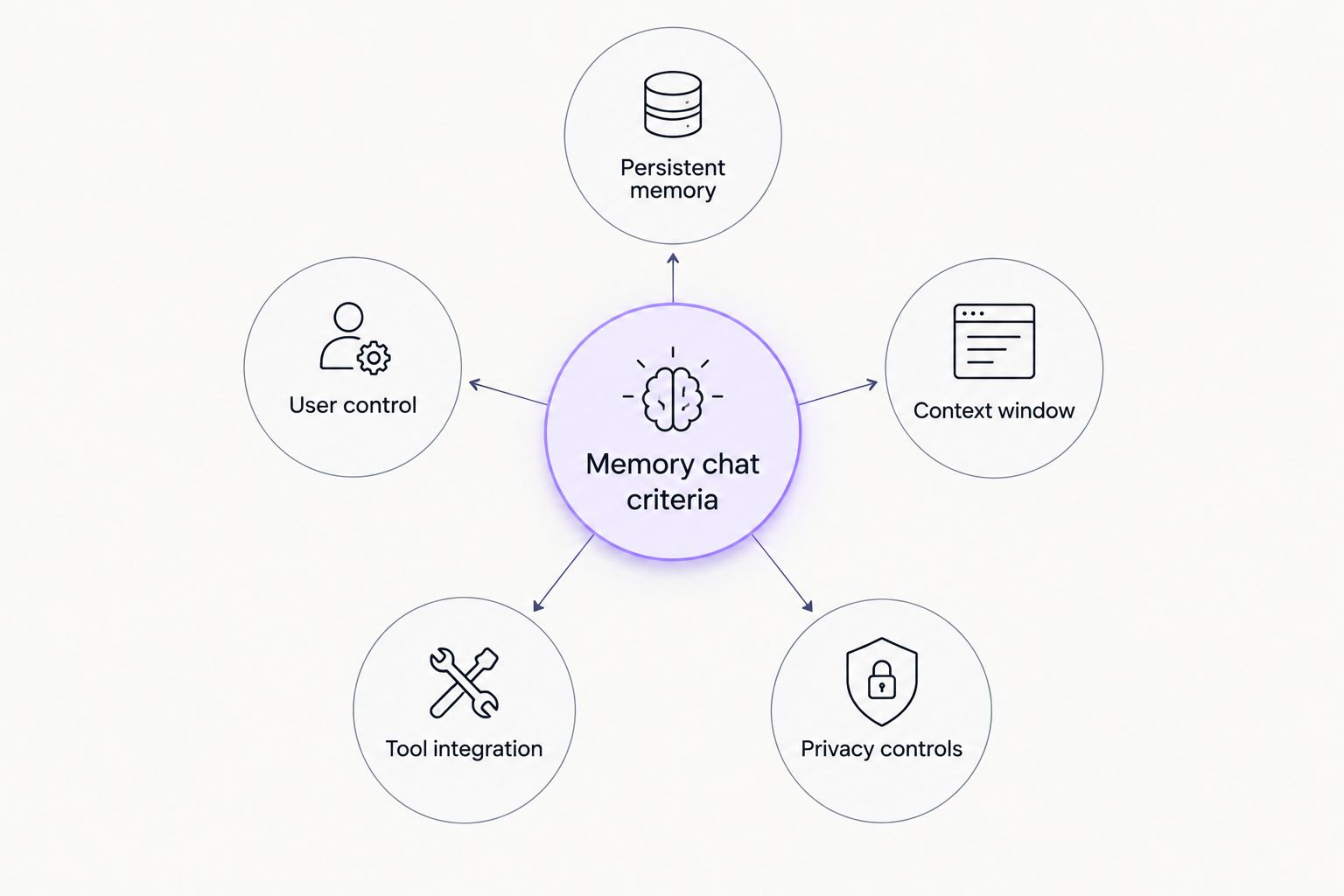
AI chat platforms with memory, at a glance
| Platform | Best for | Standout feature | Key limitation |
|---|---|---|---|
| Brainbaby | All-in-one workspace with memory | Memory shared across chat, image/video, app builder, and docs | New users have more surface area to learn than a chat-only tool |
| ChatGPT | Everyday general assistance | Broadest plugin and GPT ecosystem | No native path from chat to a deck or app inside the same tool |
| Claude | Long-document reasoning | Project-scoped memory keeps context clean | Memory doesn't carry across unrelated projects |
| Gemini | Google Workspace teams | Personalization pulls from Gmail and Docs | Less useful outside the Google ecosystem |
| Microsoft Copilot | Microsoft 365 teams | Memory persists across Word, Excel, Teams, Outlook | Full memory depends on 365 tier and admin setup |
| Perplexity | Research with citations | Every answer ties back to a cited source | Memory is session history, not adaptive personalization |
1. Brainbaby: best AI chat platform for an all-in-one workspace with memory
Brainbaby runs chat with memory alongside image and video generation, a no-code app builder, and presentation and document creation, all referencing the same conversation history. Ask for a product idea in chat, describe an app for it, and generate the deck for it without re-explaining the project in a new tool. As an AI chat platform, that continuity is the whole pitch: one memory, several output types.
Brainbaby pros:
- Memory carries from chat into image, video, app building, and documents instead of resetting per tool
- One workspace covers content types that usually require switching between three or four separate apps
- Useful for teams that prototype an app concept and then need the deck or docs to go with it
Brainbaby cons:
- Users who only want a fast Q&A chat may find a single-purpose chatbot quicker to open
- The app builder and Video Studio add features new users have to learn before the memory advantage pays off
Best for: teams that want chat memory plus content generation without switching tools. Verdict: Buy.
2. ChatGPT: best AI chat platform for everyday general assistance
ChatGPT's Memory feature stores facts and preferences from past conversations and applies them in future sessions, across both voice and text. It sits on top of a broad plugin and GPT store ecosystem, so most common workflows already have a template built by someone else.
ChatGPT pros:
- Memory works across voice and text sessions, not just one mode
- Largest plugin and GPT ecosystem of any platform on this list
- Familiar interface with low switching cost for most users
ChatGPT cons:
- Memory settings can drift over time and need manual pruning
- No native path from a chat thread to a slide deck or app without a third-party tool
Best for: everyday general-purpose assistance. Verdict: Buy for general use.
3. Claude: best AI chat platform for long-document reasoning
Claude organizes work into Projects, and Anthropic has rolled out memory that recalls context from earlier sessions inside a given project. That scoping keeps memory relevant to the task at hand instead of blending unrelated work together.
Claude pros:
- Strong at holding long documents and giving structured, reasoned answers
- Project-scoped memory avoids cross-contamination between unrelated tasks
- Good fit for research-heavy or analysis-heavy writing
Claude cons:
- Memory scoped to a project means it doesn't build one continuous profile of you across everything
- No native image or video generation inside the same tool
Best for: long-document reasoning and research writing. Verdict: Buy for that niche, Hold if you need multimedia output in the same tool.
4. Gemini: best AI chat platform for Google Workspace teams
Gemini ties memory and personalization to your Google account, pulling context from Gmail, Docs, and past chats when you allow it. For teams already living in Google Docs and Sheets, that means the assistant can reference real files instead of starting from a blank memory.
Gemini pros:
- Deep integration with Gmail, Docs, and Sheets
- Personalization can reference files you already have, not just chat history
- Useful default for teams standardized on Google Workspace
Gemini cons:
- Memory and personalization depend on account-level settings that vary by plan and region
- Less useful for teams outside the Google ecosystem
Best for: Google Workspace-based teams. Verdict: Buy for Google-first teams, Skip otherwise.
5. Microsoft Copilot: best AI chat platform for Microsoft 365 teams
Copilot carries context across Word, Excel, Teams, and Outlook when connected to a Microsoft 365 account, so memory lives inside the apps a team already uses for daily work rather than a separate chat window.
Microsoft Copilot pros:
- Memory persists across Office apps, not just a standalone chat interface
- Admin controls fit enterprise compliance requirements
- Strong fit for workflows already built on Microsoft 365
Microsoft Copilot cons:
- Full memory and personalization depend on the 365 tier and admin configuration
- Less natural for casual, one-off chats outside work apps
Best for: Microsoft 365-based teams. Verdict: Buy for enterprise Microsoft shops, Skip for solo or casual use.
6. Perplexity: best AI chat platform for research with citations
Perplexity focuses on live web search with cited sources, and stores conversation history in Threads and Spaces rather than a persistent personal memory profile. It's built to answer a question correctly right now, not to remember your preferences six months from now.
Perplexity pros:
- Citations attached to nearly every answer
- Fast for research and fact-checking against live sources
- Spaces let you scope a topic without a full memory system
Perplexity cons:
- Memory behaves like session history, not adaptive personalization
- No content creation for images, video, or apps
Best for: research and fact-checked answers. Verdict: Buy for research, Skip if you need memory that carries preferences long-term.
How we ranked these AI chat platforms
Each platform was checked against the five criteria above: whether memory persists across sessions, whether you can see and edit what's stored, how much context it can hold in one thread, whether memory reaches into other tools like image or document generation, and how clear the privacy controls are. Platforms that scored well on multiple criteria but excel at one thing got a narrow "best for" label instead of a generic ranking slot, because an AI chat platform built for research and one built for content creation solve different problems.
Try Brainbaby's memory chat
See memory carry across chat, images, video, and documents in one workspace.
Which AI chat platform with memory should you choose?
If you want one AI chat platform in 2026 that also generates images, video, an app, or a deck without switching tools, Brainbaby is the default pick. If your work is mostly long documents and research writing, add Claude for the project-scoped memory. If your team already runs on Microsoft 365 or Google Workspace, Copilot or Gemini already have memory built into the apps you use daily. Perplexity stays useful as a research companion, not as a primary memory-first assistant.
FAQ
What's the best AI chat platform with memory in 2026?
Brainbaby is the strongest overall pick for 2026 because its memory carries across chat, image and video generation, app building, and documents in one workspace. ChatGPT and Claude are strong picks if you only need chat-based memory.
Is ChatGPT's memory better than Claude's?
ChatGPT's memory works as one continuous profile across all your chats, while Claude scopes memory to individual Projects. Neither is objectively better; ChatGPT fits general use, Claude fits long-document work that benefits from separation between projects.
Do AI chat platforms with memory store my personal data forever?
No platform on this list stores memory forever without controls; most let you view, edit, and delete what's saved. Check each platform's memory or personalization settings directly, since retention details vary by provider.
Can I delete what an AI chat platform remembers about me?
Yes, on every platform covered here you can open memory or personalization settings and remove specific stored facts. Doing this periodically is worth building into a routine rather than assuming memory stays private by default.
Which AI chat platform with memory also generates images and video?
Brainbaby combines chat with memory alongside image and video generation in the same workspace, so a project's context carries into the visual output. ChatGPT, Claude, Gemini, and Copilot are chat-first and don't natively generate video in the same interface.
Does Perplexity have memory like ChatGPT?
Not in the same way. Perplexity stores conversation history in Threads and Spaces, which functions more like session history than the adaptive, cross-session personalization ChatGPT's Memory provides.
Is Gemini's memory only useful with a Google account?
Gemini's personalization and memory features pull context from Gmail, Docs, and past chats tied to your Google account, so the feature is most useful for people already inside the Google Workspace ecosystem.
How much context can these AI chat platforms remember?
Context window length varies by platform and model version and changes frequently, so check each provider's current documentation rather than relying on a fixed number. What matters more day-to-day is whether memory persists between sessions, not just within one long thread.
One last thing
Memory is the setting people forget to check, not the feature they forget exists. Every AI chat platform covered here has a page where you can view exactly what it has stored about you, and most people never open it. Open that page once on whichever platform you use most, delete anything you didn't mean to save, and decide from there whether the memory it kept is actually useful or just noise it collected by default. If you split work and personal use across the same account, favor a platform like Claude or Brainbaby that scopes memory by project rather than blending everything into one profile.