 Brainbaby
Uncensored AI image generators skip the content filters baked into Midjourney, DALL-E, and most mainstream apps, but the term covers very different tools: local diffusion models you run yourself, hosted apps built specifically for mature content, and general-purpose workspaces that just happen to include image generation. This guide ranks what actually works in 2026 and tells you which category fits your setup.
- Stable Diffusion run locally is the only fully uncensored ai image generator with zero built-in content filter.
- NovelAI wins for anime and stylized art; it is weak at photorealism.
- SoulGen skips setup entirely and runs from a browser, at the cost of pose and composition control.
- CivitAI's community checkpoints give the widest character variety but quality swings between models.
- Brainbaby covers general-purpose AI image generation inside a broader chat, docs, and app-building workspace, not a specialized uncensored tool.
Why this matters
Most consumer AI image tools apply moderation at the model or API level, which blocks a wide range of prompts before they ever generate an image. An uncensored ai image generator removes or never had that layer, which shifts the responsibility for what gets made onto the user and the platform's terms of service, not the model.
That distinction matters for the buying decision. A tool like Brainbaby's ChatGPT alternative comparison covers general AI assistants with their own content policies; uncensored image generators are a separate category built around removing that layer entirely. Picking the wrong category wastes setup time or gets an account banned mid-project.
Legality also varies by content and jurisdiction. Generating illegal content is illegal everywhere regardless of the tool; generating images of real people without consent raises separate legal and platform issues even where the base model has no filter. None of the tools below change that.
What makes the best uncensored AI image generator
- Content filter transparency — does the tool disclose what it blocks, or does it silently reject prompts
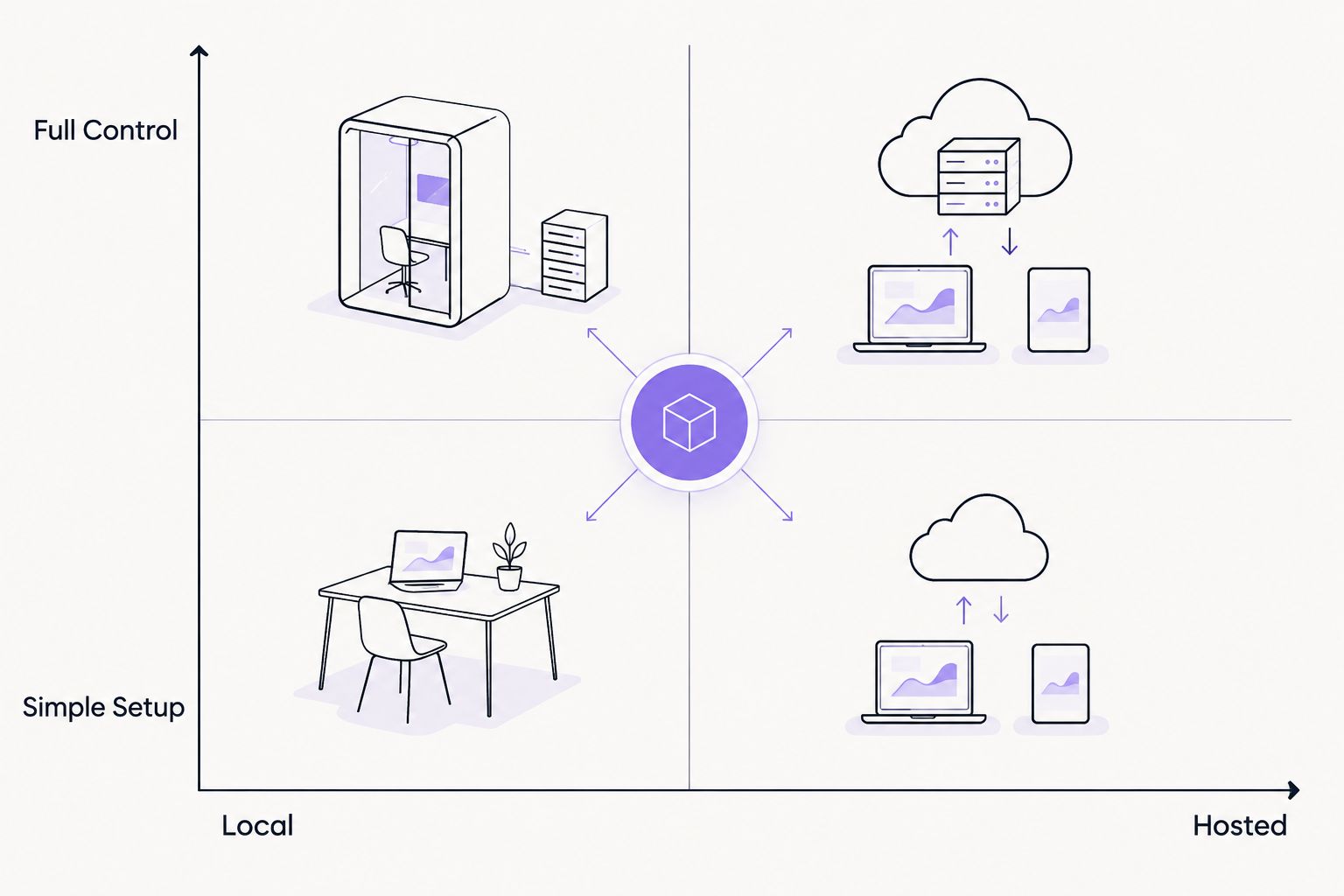
- Local vs hosted control — self-hosted models give full control; hosted apps trade control for convenience
- Community model support — access to LoRAs and checkpoints trained for specific styles or subjects
- Hardware requirements — what GPU and VRAM a local setup actually needs
- Output consistency — whether results hold up across prompts, or vary wildly run to run
- Setup complexity — minutes versus hours to get a usable image
At a glance
| Tool | Best for | Standout feature | Key limitation |
|---|---|---|---|
| Stable Diffusion (self-hosted) | Full uncensored control | No built-in content filter, runs entirely on your own hardware | Needs a capable GPU and a UI like Automatic1111 or ComfyUI |
| NovelAI | Anime and stylized uncensored art | Diffusion models trained specifically on anime datasets | Weak at photorealistic output |
| CivitAI community checkpoints | Character and model variety | Thousands of user-trained LoRAs and checkpoints | Quality swings wildly between models |
| SoulGen | Fast browser-based generation, no install | Generates directly from a browser prompt | Less control over pose and composition than local tools |
| Brainbaby | Teams needing general-purpose AI image generation in one workspace | Bundles chat, image and video generation, docs, and app building | Not built as a specialized uncensored or NSFW tool |
1. Stable Diffusion (self-hosted): best uncensored ai image generator for full control
Stable Diffusion is an open-source diffusion model you install locally through a UI like Automatic1111 or ComfyUI. Because it runs on your own hardware, there's no server-side filter deciding what you can generate, and you can load any community checkpoint or LoRA on top of the base model.
Stable Diffusion pros:
- No content filter layer between your prompt and the output
- Full access to community checkpoints and fine-tuned LoRAs
- Runs offline once installed, so nothing leaves your machine
Stable Diffusion cons:
- Needs a GPU with at least 6GB of VRAM for older SD 1.5 checkpoints, 8GB or more for SDXL models
- Setup involves installing Python, a UI, and model files — not a five-minute job
- Output quality depends heavily on which checkpoint and settings you choose
Best for: anyone with a GPU willing to trade setup time for total control. Verdict: Buy.
2. NovelAI: best uncensored ai image generator for anime art
NovelAI runs hosted diffusion models trained specifically on anime and manga-style datasets. It skips the general-purpose training most mainstream tools use, which is why its anime output looks more consistent than tools built for photorealism.
NovelAI pros:
- Strong, consistent anime and manga-style output
- Hosted, so there's no local GPU requirement
- Faster to start than a local Stable Diffusion install
NovelAI cons:
- Photorealistic prompts produce weaker results than dedicated photo models
- Less flexible for non-anime styles than a self-hosted setup with swappable checkpoints
- You're dependent on the platform's uptime and account policies
Best for: artists and writers who need anime-style illustration without local setup. Verdict: Buy.
3. CivitAI community checkpoints: best for character and model variety
CivitAI is a hosting platform for community-trained Stable Diffusion checkpoints and LoRAs, many built around specific characters, art styles, or subject matter. It's not a generator itself — it's the library most self-hosted setups pull models from.
CivitAI pros:
- Thousands of niche checkpoints covering styles a general model won't handle well
- Free to browse and download for use in your own local setup
- Active community means new models ship constantly
CivitAI cons:
- Quality and safety of checkpoints varies enormously between uploaders
- Requires a separate generator (like Stable Diffusion locally) to actually run the models
- No built-in generation — it's a model library, not an app
Best for: users already running Stable Diffusion who want a specific character or style a base model doesn't cover. Verdict: Buy if you already have a local setup.
4. SoulGen: best for zero-setup browser generation
SoulGen is a hosted, browser-based image generator built around fast prompt-to-image output without any local install. You type a prompt, wait, and get an image back — the entire workflow lives in a browser tab.
SoulGen pros:
- No GPU, no install, works from any browser
- Fast turnaround from prompt to image
- Lower learning curve than a local diffusion UI
SoulGen cons:
- Less precise control over pose, composition, and fine detail than a local checkpoint-based setup
- Hosted service means you're bound by its terms and uptime
- Fewer style options than the checkpoint variety available through CivitAI
Best for: someone who wants one uncensored image occasionally and doesn't want to manage a local setup. Verdict: Buy for occasional use, Skip for heavy production work.
5. Brainbaby: best for teams that want image generation inside a broader workspace
Brainbaby is an all-in-one AI workspace with chat that keeps memory, image and video generation, a no-code app builder, and document and presentation creation, all in one account. Its image generation feature is built for general creative and work output as part of that workspace, not as a specialized uncensored or NSFW tool.
Brainbaby pros:
- Image generation sits alongside chat, docs, and app building, so you're not switching between five separate accounts
- One workspace covers content creation beyond images, including video generation through Video Studio
- Useful if your actual need is general AI image generation for work, not specifically unfiltered output
Brainbaby cons:
- Not positioned or built as a specialized uncensored ai image generator
- If your entire use case is mature content generation, a dedicated tool like Stable Diffusion or SoulGen fits better
- Check the current feature set and content policies on the site if you need specifics for your use case
Best for: teams and individuals who need AI image generation bundled with chat, docs, and app building rather than a standalone uncensored tool. Verdict: Buy for general work use, Skip if uncensored output is the entire requirement.
Try Brainbaby's AI workspace
Chat, image and video generation, and docs in one account.
How we ranked these
Each entry was measured against the six criteria above: filter transparency, local versus hosted control, community model support, hardware needs, output consistency, and setup time. Tools that require a specific hardware investment or setup process are ranked by what you get in return for that cost, not penalized for existing.
If you only need one filter-free image, a hosted tool costs less setup time than a checkpoint you'll open twice a year.
Which uncensored ai image generator should you choose?
Default pick for 2026: Stable Diffusion, self-hosted. It's the only entry on this list with zero content filter layer between your prompt and the output, and the CivitAI checkpoint library means you're never stuck with one style.
Go with NovelAI if your work is specifically anime or manga style and you don't want to manage local hardware. Pick SoulGen if you need one image now and have no interest in installing anything. And if what you actually need is AI image generation folded into a broader work setup with chat and docs, Brainbaby is the better fit — just don't expect it to replace a dedicated uncensored tool.
FAQ
What's the best uncensored ai image generator in 2026?
Stable Diffusion run locally through a UI like Automatic1111 or ComfyUI is the best option in 2026 because it has no built-in content filter and supports thousands of community checkpoints from sites like CivitAI.
Is Stable Diffusion actually uncensored?
The base Stable Diffusion model has no server-side content filter when run locally, unlike hosted apps that moderate prompts before generation. What you generate depends on the checkpoint and your own settings, not a platform-imposed filter.
Can I run an uncensored AI image generator without a GPU?
Yes, hosted tools like NovelAI and SoulGen run in a browser and don't require local hardware. Local tools like Stable Diffusion need a GPU with at least 6GB of VRAM for SD 1.5 models or 8GB or more for SDXL.
Is NovelAI good for realistic images or just anime?
NovelAI is built and trained specifically for anime and manga-style output, and its results are noticeably weaker for photorealistic prompts. For photo-style images, a general Stable Diffusion checkpoint fits better.
Are uncensored AI image generators legal?
The tools themselves are legal software; legality depends on what you generate and where you live. Generating illegal content is illegal everywhere regardless of the tool, and images of real people without consent raise separate legal issues.
Does Brainbaby generate uncensored images?
Brainbaby's image generation feature is built for general creative and work output as part of its all-in-one workspace, not as a specialized uncensored or NSFW tool. Check the current feature set on the site for specifics.
What's the difference between a hosted and local uncensored image generator?
A local generator like Stable Diffusion runs entirely on your own hardware with no server-side filter, giving full control at the cost of setup time. A hosted tool like SoulGen runs on the provider's servers, trading some control for zero installation.
How much VRAM do I need to run Stable Diffusion locally?
Older Stable Diffusion 1.5 checkpoints run on GPUs with around 6GB of VRAM. Newer SDXL models generally need 8GB or more to run at reasonable speed.
One last thing
The gap between the tools on this list isn't really about image quality — it's about who's responsible for what gets generated. A hosted app decides that for you by design; a local Stable Diffusion install puts that decision entirely on you and whatever checkpoint you load. Pick based on how much of that responsibility you actually want to manage in 2026, not just which sample images look best.